For people who don't code
A Local AI Assistant for People Who Don't Code
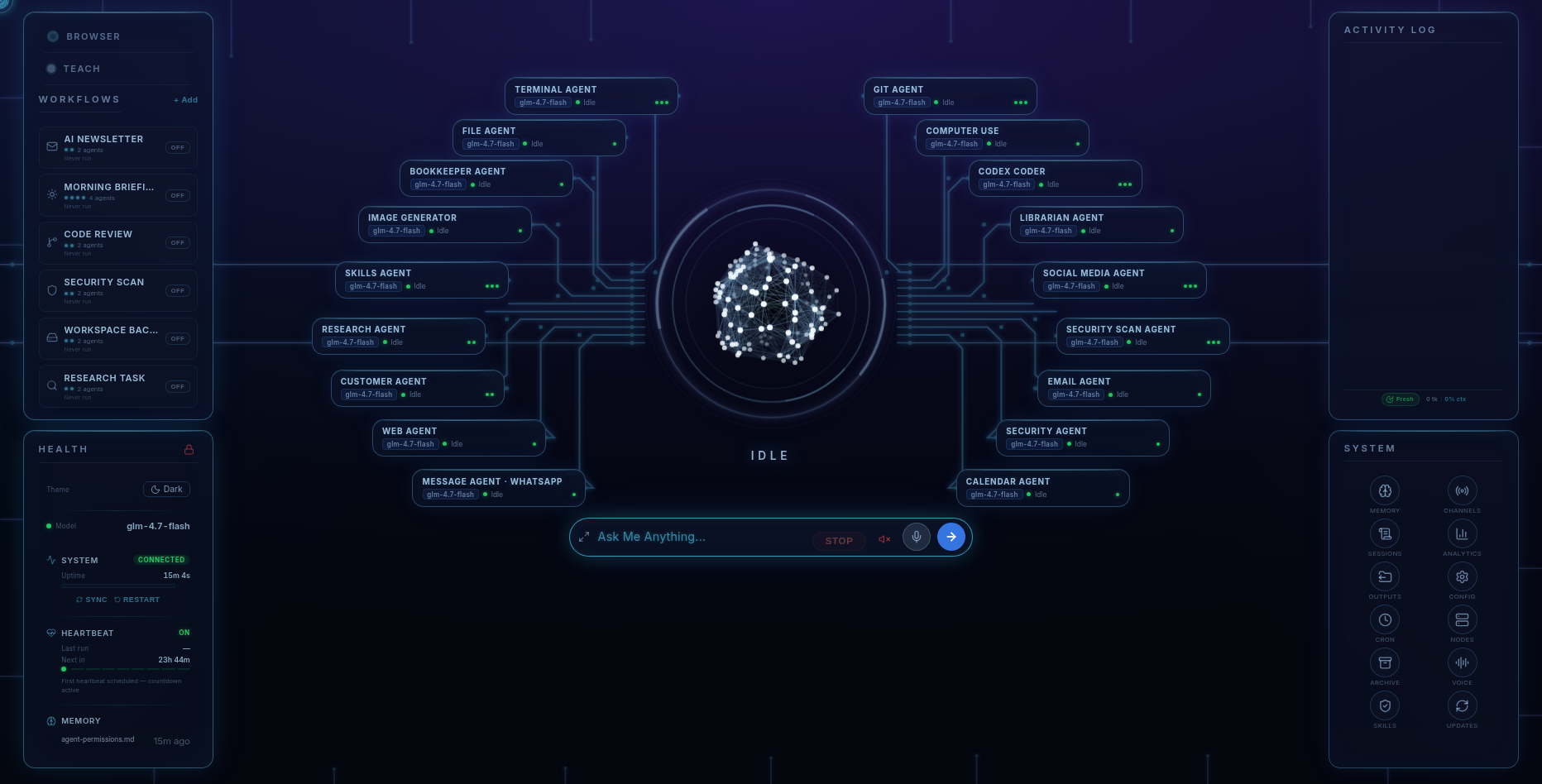
Fred is a BYOK harness that installs on your Windows or Linux computer. Use its dashboard or text it through WhatsApp or Telegram to coordinate research, email, creative work, bookkeeping, and more through 18 specialist agents. Fred’s software licence is $99. You connect your own model access and pay your chosen provider separately. Fred is BYOK: connect your own model access, with access and usage billed separately by your chosen provider.
No developer required
No terminal. No config files. No developer.
Most "run AI on your own machine" tools assume you're comfortable in a terminal. Fred assumes you're not, and that's fine. You install it like any other app. Once — just once — you paste in an AI key when it asks for it. After that, you're only ever talking to Fred: from the dashboard at your desk, or by text from your phone.
What it does
What Fred actually does
You ask; the right specialist handles it. In plain terms, Fred can:
- Manage your inbox — read, sort, flag what matters, and draft replies for your approval.
- Do research and write reports — give it a topic; it searches, reads, synthesises, and hands back a structured report.
- Handle bookkeeping and invoices — track income and expenses, draft invoices, flag what's overdue.
- Run your social media — draft posts and manage your presence; you approve, Fred posts.
- Keep up with customers — log interactions, track follow-ups, remind you who to call before they go cold.
- Make marketing creative and web pages — research competitors, script ads, generate images (on your own machine), and even build and ship a landing page.
- Write and run code — build features, fix bugs, run tests. Real development, for people who don't code.
- Watch your security — a Security agent audits your machine and code for known vulnerabilities, exposed secrets, risky dependencies, and open ports; approval gates guard anything sensitive.
You talk to one Fred. The 18 specialists — Terminal, Files, Web, Git, Computer Use, Codex Coder, Research, Email, Calendar, Social, Messages, Security Scan, Passwords, Skills, Librarian, Image Generator, Bookkeeper, Customer — work under him.
While you're away
It works while you're away
Fred ships with six scheduled workflow presets — Morning Briefing, Security Scan, Code Review, AI Newsletter, Workspace Backup, and Research Task — that run unattended and report back. You read the summary; Fred did the work.
Two ways in
Two ways to drive it, both no-code
- The dashboard. Everything in one place — agents, workflows, permissions, real-time cost tracking, messaging channels, and security. Click, toggle, done.
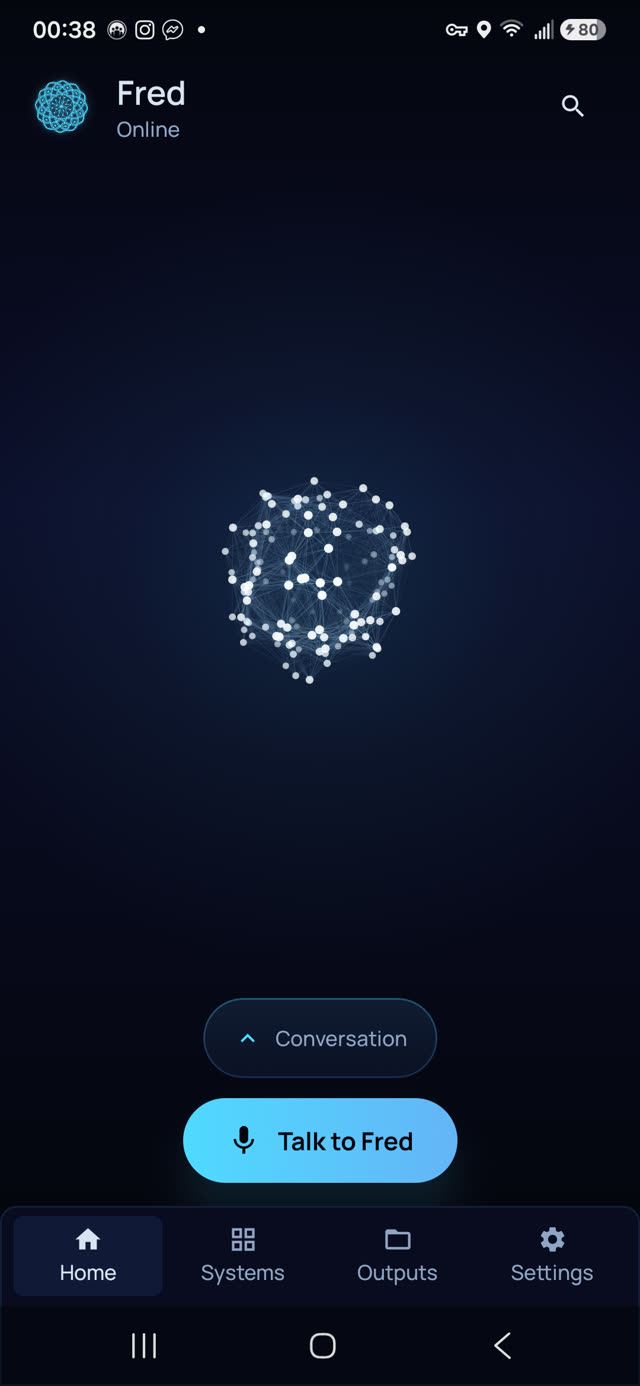
- Text. Message Fred over WhatsApp or Telegram from anywhere; the conversation is already on the big screen when you get home. One Fred, many windows. (An included Android app adds voice out loud — 32 voices — and a gallery of everything Fred has made.)
The honest requirements
What it runs on
- Windows 10/11 (x64) or Ubuntu-class Linux (x64). No macOS build. The phone app is Android only — no iPhone/iPad app.
- Roughly 0.8–1.0 GB download depending on platform, ~15 GB free disk during install, Node 24 installed automatically.
- Connect your own supported model access, or a local model through Ollama. Your chosen provider bills separately for access and usage; local models use hardware you provide.
- Internet connection required, even with a local model. Fred is local-first, not fully offline.
- Memory isn't perfect — Fred is built on the open-source OpenClaw platform, and context from earlier conversations may occasionally not be recalled with complete accuracy. Disclosed before you buy.
Who it's for
Who it's for
Fred is for people who want to coordinate tools, workflows, and AI models from a visual dashboard on their own computer. You bring the model access; Fred provides the harness around it.
Your data
Your data stays yours
Fred runs on your hardware. Memory files and credentials are stored on your computer. Cloud model requests send prompts and the context needed for the task to your chosen provider using your own key — Six Days West never sees them, stores nothing, and collects zero telemetry. Every agent has a permission matrix (terminal, file, web, messaging), and anything sensitive passes an approval gate.
Pricing
One-time. Everything from day one.
Fred’s software licence is $99. It includes the dashboard, agents, workflows, Android app, and owner’s guide. Connect your own model access; your provider bills separately for access and usage. One machine is licensed at a time, with a 14-day refund window.
Software licence: $99 once · Model-provider charges separate · 14-day refund window
FAQ
Questions people ask
Do I need to know how to code?
No. Fred is built for people who don't. You install it like any app, paste your AI key once, and then just talk to Fred — from the dashboard or by text.
How do I control it?
Two no-code ways: the visual dashboard on your computer, or by texting Fred over WhatsApp or Telegram. The Android app adds voice.
What can Fred actually do?
Email and inbox management, research and reports, bookkeeping and invoices, social media, customer follow-ups, marketing creative and web pages, writing and running code, and security auditing — handled by 18 specialist agents you reach through one Fred.
What does it run on?
Windows 10/11 (x64) or Ubuntu-class Linux (x64). No Mac version. The phone app is Android only. Internet connection required.
Is my data private?
Yes. Everything runs locally; files, memory, and credentials stay on your machine. Model calls go device-to-provider on your key. Six Days West collects no telemetry.
How much does it cost to run?
The software licence is $99. Model access and usage are separate provider charges, based on your account, chosen models, and workload.