The trust guide
An AI You Can Say No To
The short answer. The scariest version of a home AI is one that reads everything, can act on anything, and never checks with you first. That's not how Fred is built. Every agent operates behind a permission matrix you control, anything that executes on your machine sits behind an exec approval gate, prompt-injection protection actively blocks manipulation attempts hidden in the content Fred reads, and a dedicated Security agent audits your own machine on a schedule. This page explains each piece plainly — what it actually stops, and what it doesn't. Fred is BYOK: connect your own model access, with access and usage billed separately by your chosen provider.
The core idea
Capability and permission are separate questions
Fred's eighteen specialist agents are individually capable of real work — reading your inbox, running commands, editing files, posting to social media, moving money in a bookkeeping sense. Capable of doing something and allowed to do it are treated as two separate questions inside Fred. An agent can know how to send an email and still be stopped cold until you say it's allowed to, this time or every time. That separation is the whole trust model in one sentence.
In practice this shows up as three distinct mechanisms, not one vague "safety" claim: a permission matrix that scopes what each agent can touch, an approval gate on anything that executes, and active blocking against a specific, well-known attack on AI systems. Each does a different job.
Mechanism one
Permission matrices, agent by agent
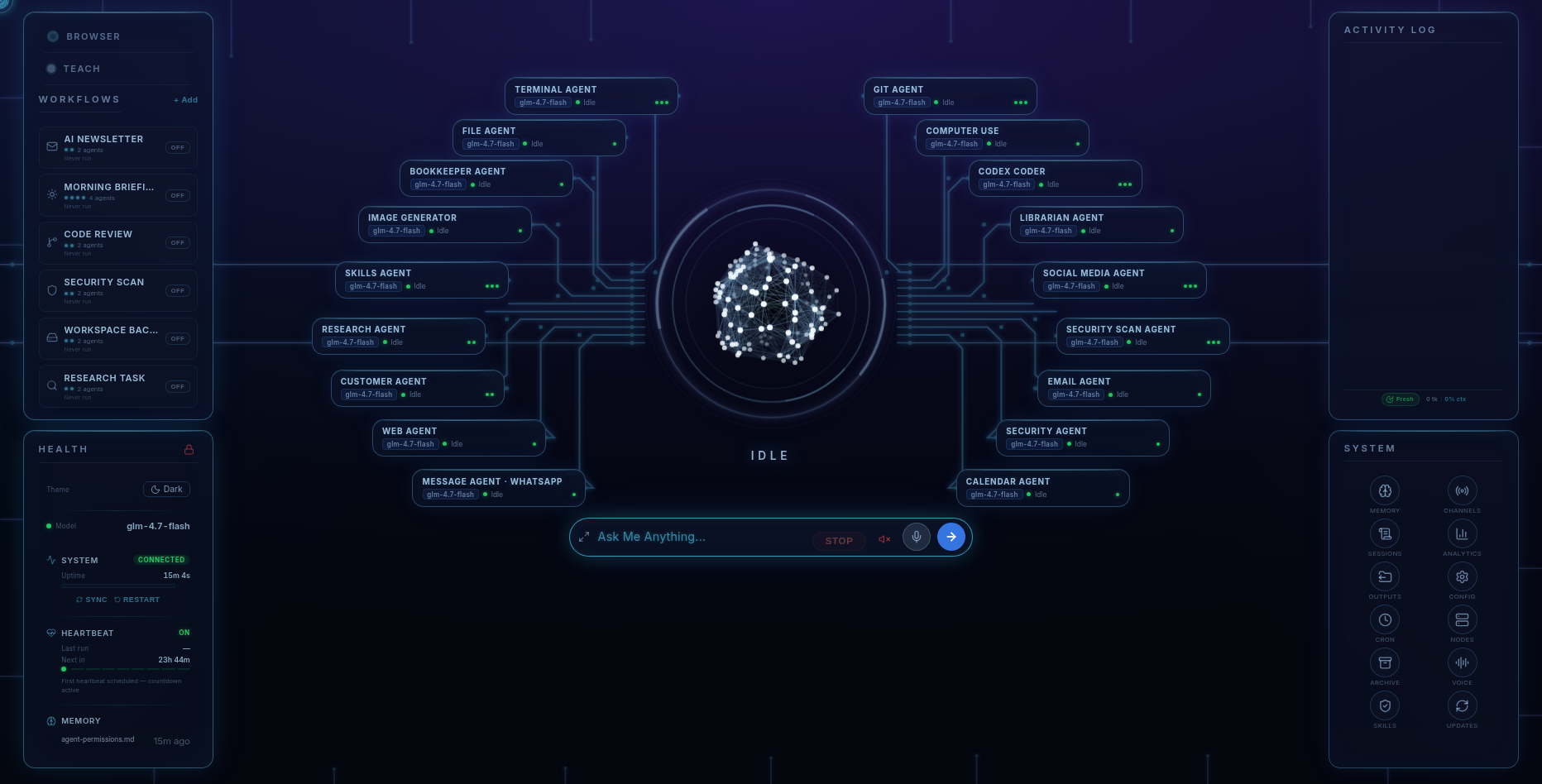
Every one of Fred's eighteen agents — Terminal, File, Web, Computer Use, Codex Coder, Research, Email, Calendar, Social Media, Security, Skills, Librarian, Message, Image Generator, Bookkeeper, Customer — has its own scope. The dashboard shows what each agent is allowed to reach and lets you narrow or widen it. A Research agent reading the web doesn't need permission to touch your bookkeeping files, and it doesn't have it by default. This isn't a single master switch for "AI access" — it's per-agent, so tightening one doesn't quietly loosen another.
Mechanism two
Exec approval gates and the sensitive-action allowlist
Anything that executes on your machine — a terminal command, a code change, an installed skill running for the first time — sits behind an exec approval gate. Fred prepares the action and shows you exactly what it's about to run before it runs it. You approve or you don't. Alongside that, an allowlist governs sensitive actions specifically: sending an email, posting publicly, spending money. The default posture across almost everything Fred does is the same one described on the scheduled-workflows page: you ask, Fred prepares, you approve, Fred acts. A handful of narrow, read-only presets are the sole exception, and even those don't touch the allowlist — they read, summarise, and report, nothing more.
Mechanism three
Prompt-injection protection with active blocking
An AI agent that reads web pages, emails, and documents can be attacked through the content itself — instructions hidden in a page or a message designed to hijack the agent into doing something the owner never asked for. This is prompt injection, and it's one of the most-discussed real risks in agentic AI right now. Fred runs prompt-injection protection with active blocking: content Fred reads is treated as content, not as instructions from you, and attempts to override that boundary get blocked rather than quietly obeyed. This runs underneath the permission matrix and the approval gates — a second layer, not a replacement for the first two.
The Security agent
Auditing your machine, not just your AI
One of the eighteen agents is Security, and its job is your machine, not Fred itself. On a schedule — the Security Scan preset — it audits for known vulnerabilities, exposed secrets sitting in files where they shouldn't be, risky dependencies in your projects, and open ports. It hands you a plain-English list of what needs attention rather than a jargon dump. You can also just ask it to run a check on demand. It's a real audit tool, not a marketing gesture: it looks at the actual state of your system and tells you what it found.
Where the boundaries sit
The honest limits
- Approval gates require you to actually read what you're approving. Fred shows you the action before it runs; it can't stop you from clicking approve without reading it. The gate is only as good as the attention you give it.
- Prompt-injection blocking reduces risk, it doesn't promise zero. It's active protection against a known attack class, not a guarantee that every future technique is caught. Treat it as a strong layer, not a substitute for sane permissions.
- The Security agent audits your machine, not the wider internet. It checks for known vulnerabilities, exposed secrets, risky dependencies, and open ports on the system Fred runs on — it isn't a penetration-testing service against outside targets.
- Your files, memory, and credentials never leave your machine — but your conversations and prompts do travel to whichever AI provider you've chosen, on your own key, so the thinking can happen. Six Days West sees none of it; your provider's own terms govern their side.
Pricing
The whole permission system, included
Fred’s software licence is $99. It includes the dashboard, agents, workflows, Android app, and owner’s guide. Connect your own model access; your provider bills separately for access and usage. One machine is licensed at a time, with a 14-day refund window.
Software licence: $99 once · Model-provider charges separate · 14-day refund window
FAQ
Questions people ask
Can Fred take actions without asking me first?
By default, no. The pattern across almost everything Fred does is: you ask, Fred prepares, you approve, Fred acts. Anything that executes on your machine sits behind an exec approval gate, and sensitive actions like sending an email or spending money sit behind an allowlist. Only six narrow, read-only scheduled presets run unattended, and even those don't touch that allowlist.
What is prompt injection, and does Fred protect against it?
Prompt injection is an attack where instructions are hidden inside content an AI reads — a web page, an email, a document — trying to hijack the agent into acting against the owner's wishes. Fred runs prompt-injection protection with active blocking, treating content Fred reads as content, not as commands, and blocking attempts to override that boundary.
What does the Security agent actually check?
The Security agent audits your own machine for known vulnerabilities, exposed secrets, risky dependencies, and open ports, and hands you a plain-English list of what needs attention. You can run it on demand or schedule it as the Security Scan preset.
Are permissions the same for every agent?
No. Each of Fred's eighteen specialist agents has its own scope in the permission matrix, shown and adjustable on the dashboard. Widening what the Research agent can read doesn't widen what the Bookkeeper agent can touch — permissions are set per agent, not with one master switch.
Does any of this stop my data from leaving my machine?
Your files, memory, and credentials never leave your machine. Your conversations and prompts do travel to whichever AI provider you've chosen, on your own key, so the model can think — Six Days West sees none of it, but your provider's own terms apply to that traffic.
Before you go
Not ready to spend $99? Take the honest guide instead.
The Straight-Answers Guide to Owning Your Own AI — every hard question on these pages, answered without the sales voice. Free, by email.
Software licence: $99 once · Model-provider charges separate · 14-day refund window
Keep reading