The autonomy guide
Work That Happens While You Sleep
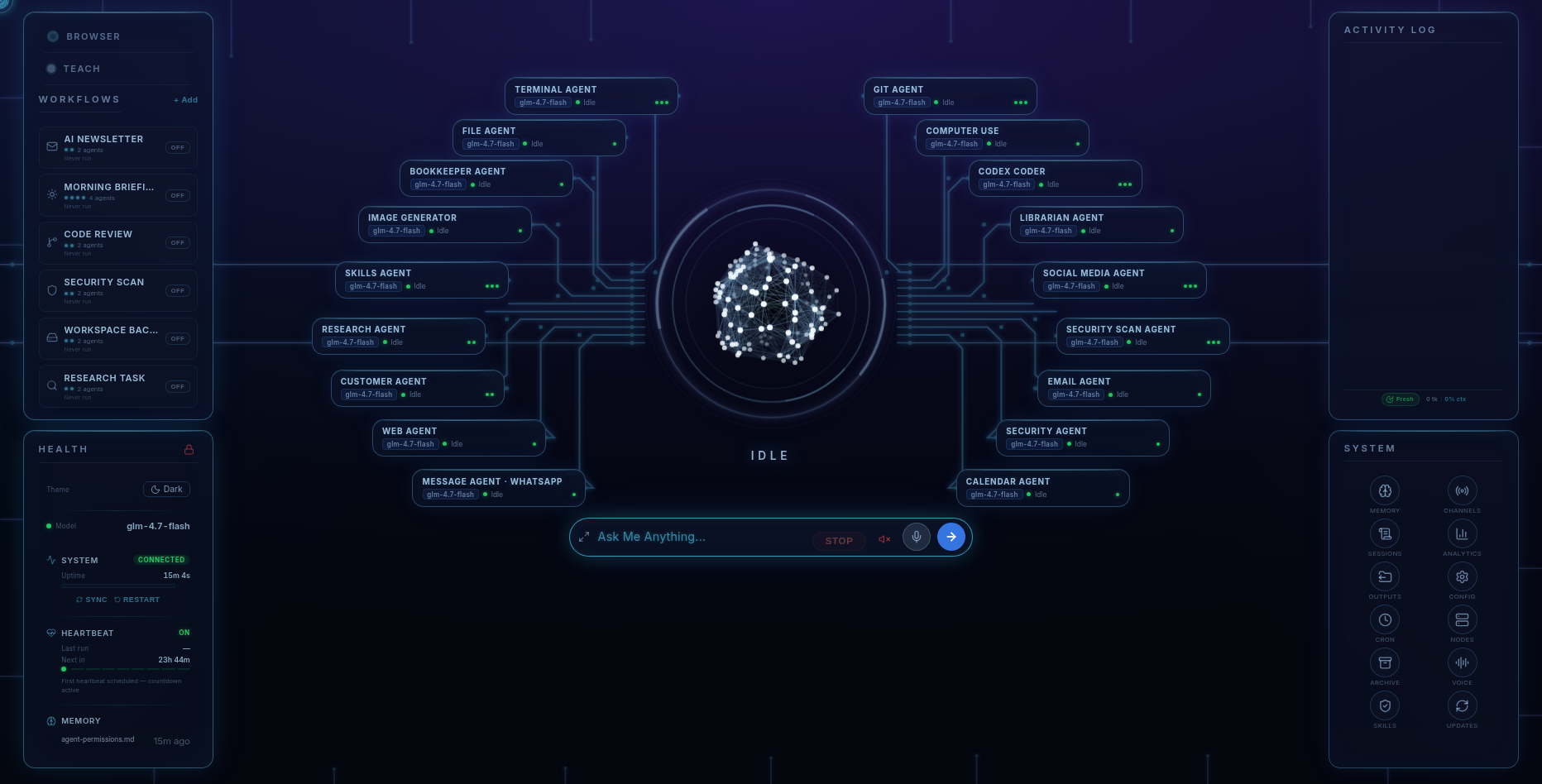
The short answer. Most of what Fred does works like this: you ask, Fred prepares, you approve, Fred acts. That's on purpose — it's how a household assistant earns trust. But there are six specific jobs built to skip the approval step entirely: Morning Briefing, Security Scan, Code Review, AI Newsletter, Workspace Backup, and Research Task. Turn one on with a schedule and it runs itself — no prompt, no approval, no one watching — then reports back. This page is the one honest place on this site to say "fully unattended," and it explains exactly what that means for each of the six. Fred is BYOK: connect your own model access, with access and usage billed separately by your chosen provider.
Why only six
Autonomy is scoped, not assumed
Fred's default posture everywhere else is "you approve, Fred posts": a draft reply waits in your inbox tab, a report waits for a read-through, an invoice waits for a send click. That's not a limitation bolted on top — it's the permission model working as intended. Anything that touches the outside world (sending an email, posting to social media, spending money) sits behind an approval gate until you say otherwise.
The six scheduled presets are different because their scope is narrow and their output is safe by default: they read, summarise, scan, and report. None of them sends money, posts publicly, or deletes anything without a separate step. That's what makes handing them a schedule and walking away a reasonable thing to do, rather than a risk you're quietly accepting.
The six presets
What each one actually does
- Morning Briefing. Your inbox triaged, your calendar summarised, and the news that matters to you condensed — finished and waiting before you sit down.
- Security Scan. The Security agent audits your machine for known vulnerabilities, exposed secrets, risky dependencies, and open ports, and hands you a plain-English list of what needs attention.
- Code Review. Codex Coder runs a pass over your projects looking for issues worth flagging — before you sit down to work, not after you've shipped something.
- AI Newsletter. A draft newsletter assembled on a schedule, ready to read over before it goes anywhere.
- Workspace Backup. Your working files backed up on a schedule, so "I forgot to back up" stops being a sentence you say.
- Research Task. A standing research question — a market, a competitor, a topic you're tracking — re-run on a schedule so the answer stays current without you re-asking it.
Each one is a preset you switch on from the dashboard and give a schedule — daily, weekly, whatever fits — not a feature you have to configure from scratch.
The rest of the week
What "unattended" doesn't mean
Turning on a preset doesn't turn off the permission system underneath it. Prompt-injection protection with active blocking still runs on everything Fred reads, exec approval gates still apply to anything that executes on your machine, and the allowlist for sensitive actions still governs what any agent is allowed to touch — scheduled or not. A Security Scan can tell you a port is open; it doesn't close it without you saying so. A Research Task can hand you a report; it doesn't email it to anyone on its own. The six presets are unattended in the sense that no one has to press "go" — they're not unattended in the sense of unsupervised.
Everywhere outside these six, the ordinary rhythm holds: you ask Fred to chase an invoice, draft a reply, or post an update, and a draft waits for your approval before anything leaves the machine.
Where the autonomy stops
The honest limits
- Only these six run fully unattended. Every other job Fred does — email, social posts, invoices, most research — stops at a draft until you approve it. That's deliberate, not a missing feature.
- Scheduled runs need the machine on and online. Fred's thinking happens at your chosen AI provider over the internet; a Morning Briefing can't run while your computer is asleep or offline.
- Reports use the memory Fred has. Recall of earlier conversations can occasionally be imperfect, so a Research Task re-run weeks apart is a fresh look, not guaranteed continuity with what came before.
- Scheduled workflows use the models you connect. Their model calls are billed under your provider’s terms, with usage visible in Fred’s dashboard.
Pricing
All six presets, included
Fred’s software licence is $99. It includes the dashboard, agents, workflows, Android app, and owner’s guide. Connect your own model access; your provider bills separately for access and usage. One machine is licensed at a time, with a 14-day refund window.
Software licence: $99 once · Model-provider charges separate · 14-day refund window
FAQ
Questions people ask
Which Fred jobs actually run without me approving anything?
Exactly six: Morning Briefing, Security Scan, Code Review, AI Newsletter, Workspace Backup, and Research Task. Everything else on Fred — email replies, social posts, invoices, most research — prepares a draft and waits for your approval before it does anything.
Why don't all of Fred's agents run unattended?
Because most useful work touches the outside world — sending money, posting publicly, emailing someone — and that should wait for a human. The six scheduled presets read, summarise, scan, and report; none of them sends, posts, or spends without a separate approved step, which is what makes running them on a schedule reasonable.
Is a scheduled workflow still protected by Fred's security gates?
Yes. Prompt-injection protection with active blocking, exec approval gates, and the allowlist for sensitive actions all still apply to scheduled runs. Unattended means no one has to press go — it doesn't mean unsupervised.
Do scheduled workflows cost extra?
The workflow presets are included in Fred’s software licence. Running them uses your configured model access, and your provider bills separately for that usage.
Does my computer need to be on for these to run?
Yes. Fred's thinking happens at your chosen AI provider over the internet, so a scheduled job needs the machine on and connected at the time it's set to run.
Before you go
Not ready to spend $99? Take the honest guide instead.
The Straight-Answers Guide to Owning Your Own AI — every hard question on these pages, answered without the sales voice. Free, by email.
Software licence: $99 once · Model-provider charges separate · 14-day refund window
Keep reading