The home AI guide
How to Get a Jarvis at Home in 2026
The short answer. The thing people actually mean by "a Jarvis" — one assistant that lives in your house, knows your stuff, does real work without being watched, and answers wherever you are — became genuinely buildable in the last two years. You can assemble one yourself from open-source parts if you're comfortable in a terminal, or you can buy one packaged and ready. This page explains what a home AI can honestly do in 2026, both routes to getting one, and where the sci-fi version still ends. Fred is BYOK: connect your own model access, with access and usage billed separately by your chosen provider.
What "a Jarvis" really means
Four things make an assistant feel like Jarvis
- It lives with you, not in a browser tab. It's installed on a machine you own. Your files, its memory of you, and your credentials stay there.
- It does work, not just conversation. Reading and drafting email, research and reports, invoices, code, web pages — finished work product, not just chat about it.
- It runs while you're away. Scheduled jobs — a morning briefing, a security scan, a backup — that happen unattended and report back.
- It's wherever you are. The same assistant, one conversation, reachable from the desk, by text from your phone, or out loud.
Cloud chatbots deliver the second item brilliantly and stop there. Smart speakers deliver a thin slice of the fourth. The full set is what a home AI is for.
Route one
Build it yourself (free, if your time is)
The open-source ecosystem is genuinely good now. An assistant engine, agent definitions, messaging bridges, and local voice models are all freely available, and a technical person can wire them into something real. The honest cost is that you become the integrator: terminal installs, config files, API key management, channel pairing, permission policy, and keeping the whole stack updated as its parts move. If that sounds like a fun weekend, it is one — we compare the DIY route honestly here, including the parts where DIY wins.
Route two
Buy it packaged: this is what Fred is
Fred is a Jarvis-style assistant sold as normal software: a wizard installer, a visual dashboard, and eighteen specialist agents — email, research, bookkeeping, social, security, code, and more — coordinated by one assistant you just talk to. If you can send a text, you can use Fred.
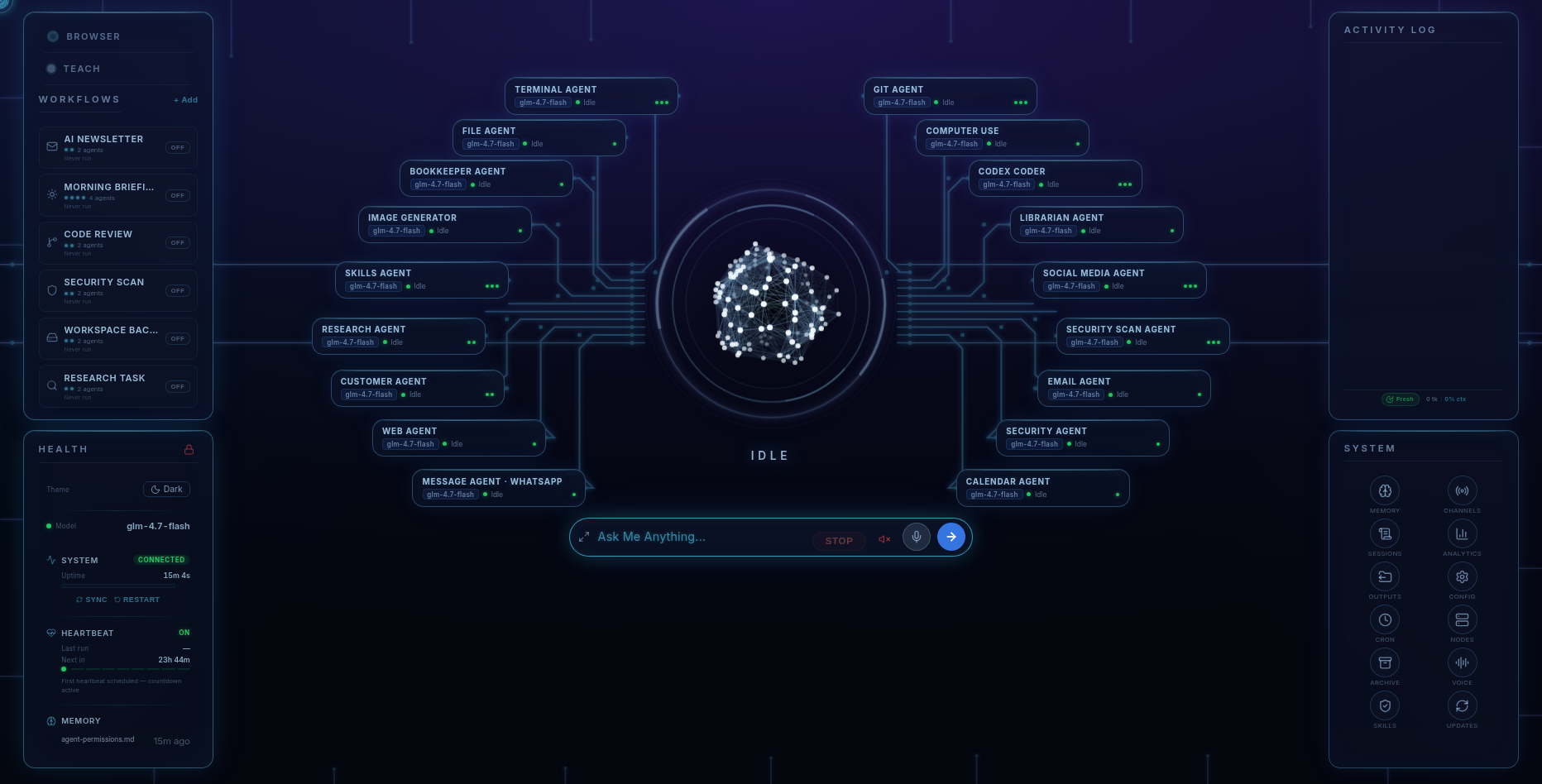
A day with it looks like this. At 7am the Morning Briefing ran by itself: inbox triaged, calendar summarised, the news that matters to you condensed — waiting with your coffee. Mid-morning you text from the van: "chase the Hendersons about the quote, politely" — a draft is waiting for your approval. After lunch: "research the three suppliers for cedar decking and give me a comparison" — a structured report lands. That evening, your daughter texts her own private Fred room about something she's not ready to tell you; it's hers, PIN-locked, on the family machine and not on a corporate server. You approve. Fred handles.
Voice, phone, family
In your pocket and in the house
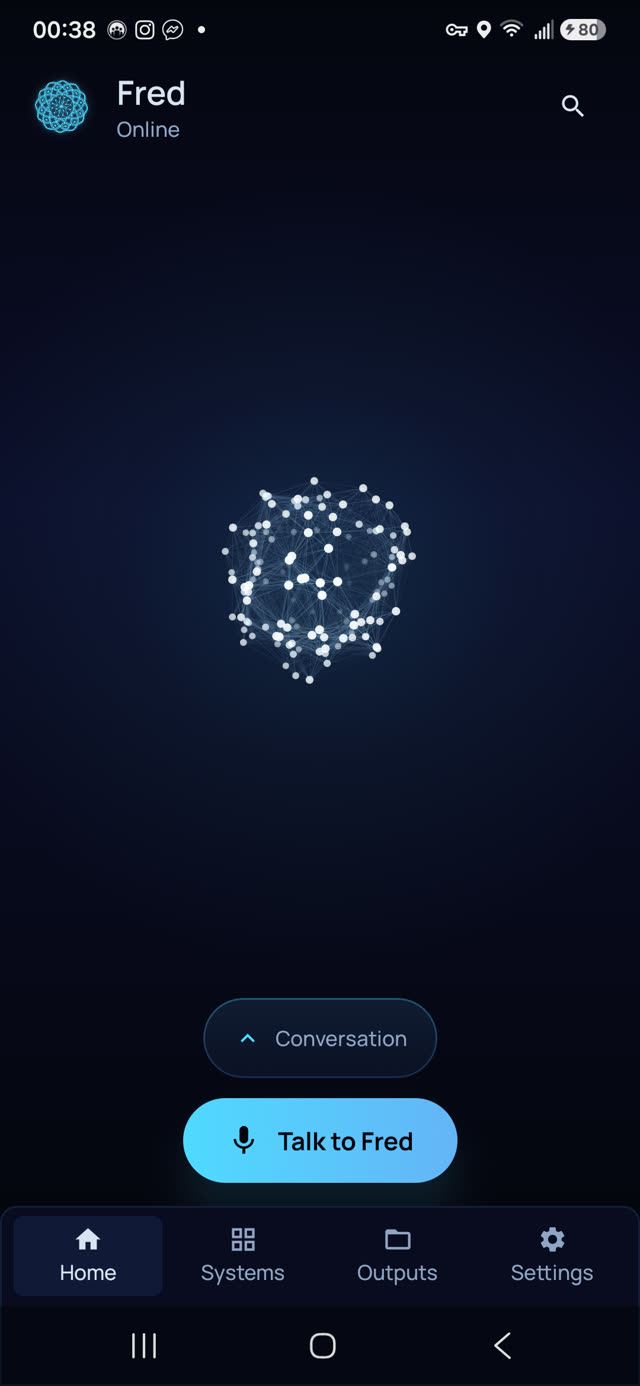
The included Android app pairs to your machine — not to any cloud — over an encrypted tunnel. Same Fred, same one conversation: chat, spoken conversation out loud with a choice of more than fifty voices, a gallery of everything Fred has made, and workflow runs from anywhere. The optional Fred Family upgrade (+$99 one-time, unlocked inside Fred) adds private PIN-locked rooms for each person in the house and Beacon, a family locator whose every position is stored and drawn only on your own machine.
Where the sci-fi ends
The honest limits
- It is not an all-knowing hologram. It's software: excellent at knowledge work, useless at running a fusion reactor, and its memory of past conversations can occasionally be imperfect. We say so before you buy.
- It needs the internet. The thinking happens at your chosen AI provider on your own key (Claude, OpenAI, or Google Gemini — or a local model via Ollama). Local-first, not fully offline.
- Platforms: Windows 10/11 (x64) or Ubuntu-class Linux (x64) — no macOS build. The phone app is Android only.
- It doesn't run your smart home. Fred does knowledge work — email, research, documents, family — not light switches. If you want timers and music, keep the smart speaker; they coexist fine.
Pricing
The whole assistant, one price
Fred’s software licence is $99. It includes the dashboard, agents, workflows, Android app, and owner’s guide. Connect your own model access; your provider bills separately for access and usage. One machine is licensed at a time, with a 14-day refund window.
Software licence: $99 once · Model-provider charges separate · 14-day refund window
FAQ
Questions people ask
Is a real Jarvis actually possible in 2026?
A useful one, yes: an assistant on your own computer that manages email, research, bookkeeping, and code through specialist agents, runs scheduled jobs while you sleep, and talks to you by text or voice from anywhere. A sarcastic hologram that runs your fusion reactor, no.
Do I need a powerful computer?
No. Fred runs on an ordinary Windows 10/11 or Ubuntu-class Linux machine — roughly 0.8–1.0 GB download depending on platform, and ~15 GB free disk during install. The heavy AI thinking happens at your chosen provider on your own key, so your hardware mostly just hosts the assistant.
Does it talk out loud?
Yes — the included Android app carries your assistant in your pocket with spoken conversation out loud and a choice of more than fifty voices. On the desktop you drive it from a visual dashboard, or by texting it over WhatsApp or Telegram.
How is this different from Alexa or Google Home?
Smart speakers set timers and play music by sending your voice to a corporate cloud. A Jarvis-style assistant does knowledge work — email, research, invoices, code, family coordination — and in Fred's case it lives on your machine: files, memory, and credentials never leave your computer.
What does it cost to run?
Fred’s software licence is $99. Your provider bills separately for model access and usage. The dashboard shows model usage so you can follow the cost of the work you delegate.
Before you go
Not ready to spend $99? Take the honest guide instead.
The Straight-Answers Guide to Owning Your Own AI — every hard question on these pages, answered without the sales voice. Free, by email.
Software licence: $99 once · Model-provider charges separate · 14-day refund window
Keep reading