Honest comparison
Fred vs DIY: the Open-Source Route and the Packaged Route
"Can't I just build this myself?" Yes. Fred runs on the open-source OpenClaw engine, and we say so on the box — a technical person can absolutely assemble the free version: install the engine, configure agents, wire channels. What you can't download is the time: Fred is that same idea curated over months and crafted with intent — the agent roster shaped and reshaped, the permissions tuned, the presets distilled, release after release — so that your part takes an afternoon. $99 once, and you're living in the future today instead of building it for a month of evenings. Here's the honest split. Fred is BYOK: connect your own model access, with access and usage billed separately by your chosen provider.
Respect first
What the DIY route gets right
- Free, forever. The engine is open source. Your only costs are AI usage on your key and your time.
- Total flexibility. Any agent shape, any tool, any experiment. The ecosystem moves fast and you're at the frontier of it.
- You'll understand your machine. Building it teaches you how it works — worth something real.
If that reads like a good month of evenings, take the DIY route with our blessing. The engine deserves its community.
The honest ledger
What DIY actually asks of you
- The install. Terminal, package managers, Node versions, service files. Comfortable territory for a developer; a wall for everyone else.
- The configuration. Agents don't arrive as a working household — you define their roles, their tools, and crucially their permissions, one config file at a time. Get the permissions wrong and your assistant is either paralysed or dangerously free.
- The channels. WhatsApp/Telegram pairing, voice, a phone connection if you want one — each its own project.
- The upkeep. The stack moves quickly; updates are yours to track, test, and repair when something shifts underneath.
- The support. Forums and issue trackers — excellent, and nobody's job.
The part you can't download
What the months of curation bought
The engine is free; the judgment isn't. Fred's eighteen-agent household wasn't generated — it was curated: the roster reshaped as real use taught us what a home actually needs, the permission matrices tuned until agents were useful without being dangerous, the six workflow presets distilled from the jobs people actually delegate, the installer rebuilt until a non-technical person could finish it alone. That's months of decisions, made with intent, so you don't spend your evenings making them by trial and error. DIY hands you the parts. Fred hands you the verdicts.
What the $99 buys
Fred is the install experience, sold as a product
- A wizard, not a terminal. Install like any app on Windows 10/11 or Ubuntu-class Linux; paste your AI key once; meet Fred.
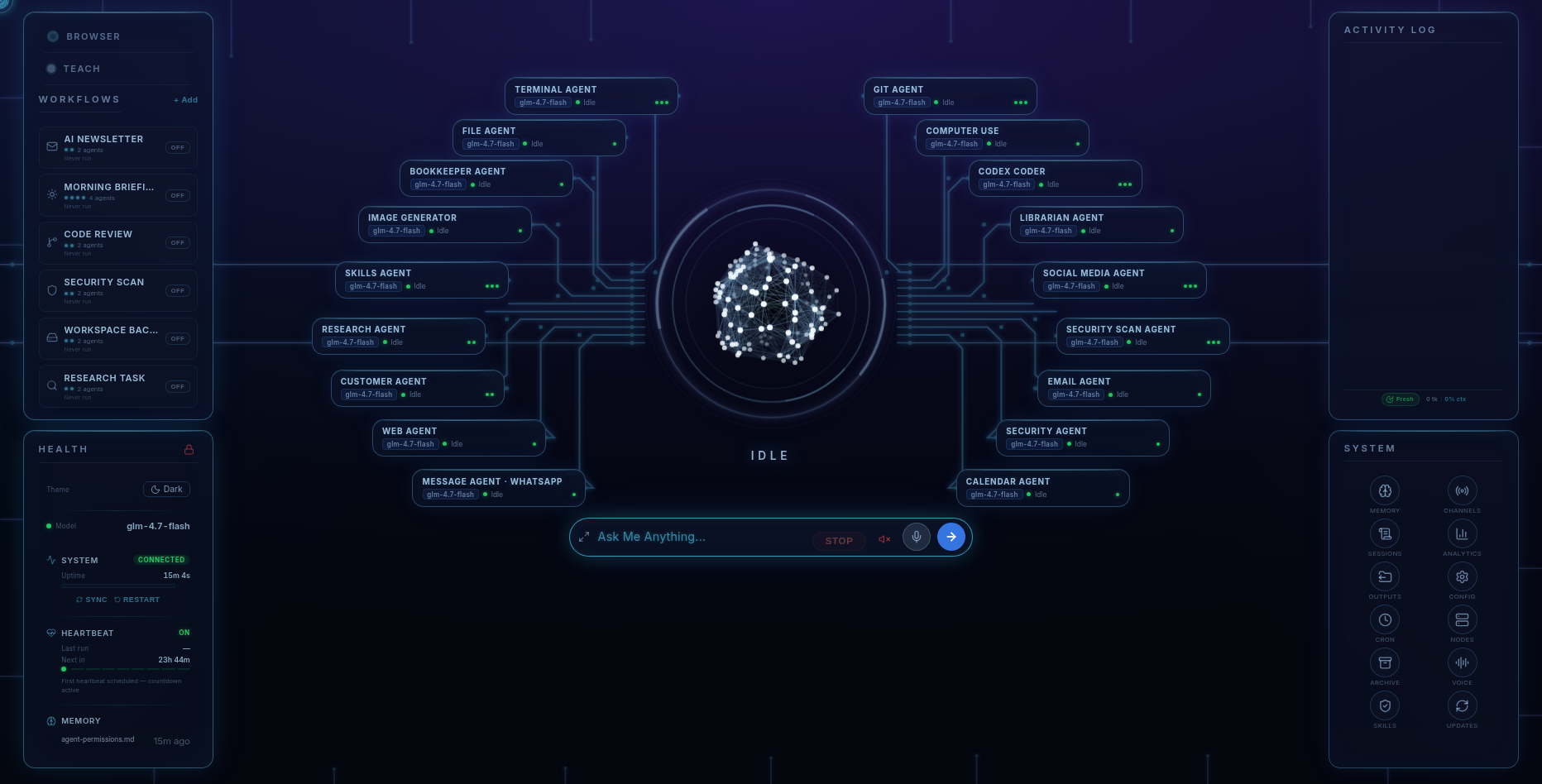
- A configured household. Eighteen specialists — Terminal, Files, Web, Git, Computer Use, Codex Coder, Research, Email, Calendar, Social, Messages, Security Scan, Passwords, Skills, Librarian, Image Generator, Bookkeeper, Customer — arrive with sensible permission matrices and approval gates already set.
- The dashboard. Agents, workflows, permissions, real-time cost tracking, channels, and security on one screen — the control plane DIY never quite gets around to.
- The phone. The included Android app pairs to your machine over an encrypted tunnel: chat, spoken voice with 32 choices, outputs gallery, workflows. No cloud in the middle.
- The family layer. Optional Fred Family (+$99, unlocked in-app): PIN-locked private rooms per person and Beacon, the locator that keeps every position on your own machine.
- Safety configured, not aspirational. Prompt-injection protection with active blocking, exec approval gates, and an allowlist for sensitive actions — on from day one.
- A year of updates and a human at [email protected]. Plus an owner's guide that tells you the truth, including the limits.
Choose your road
The honest split
- Take DIY if: you're at home in a terminal, you want the bleeding edge more than you want finished, and the building is part of the fun. Free is a great price for a hobby you'll love.
- Take Fred if: you want the household AI without acquiring a sysadmin hobby — installed in minutes, governed from a dashboard, on your phone, with your family in it, and supported. $99 once is a great price for a month of evenings you keep.
- Either way: the running costs are the same honest BYOK story — your key, your provider's rates, your choice of model.
Pricing
The paved road
Fred’s software licence is $99. It includes the dashboard, agents, workflows, Android app, and owner’s guide. Connect your own model access; your provider bills separately for access and usage. One machine is licensed at a time, with a 14-day refund window.
Software licence: $99 once · Model-provider charges separate · 14-day refund window
FAQ
Questions people ask
Is Fred just a wrapper around open source?
Fred runs on the open-source OpenClaw engine and says so plainly. What you buy is everything around the engine: a wizard installer, eighteen preconfigured specialist agents with sensible permission matrices, the visual dashboard, the Android app with voice, the Family rooms and Beacon locator, an owner's guide, support, and a year of updates.
Can't I just build this myself?
Yes — if you're comfortable with a terminal, config files, API keys, and maintaining a moving stack, the open-source route is free and endlessly flexible. What the $99 buys is the months of curation you'd otherwise do by trial and error: a working eighteen-agent household, tuned permissions, distilled workflow presets, and an installer that finishes in an afternoon.
Can I customize Fred like a DIY setup?
A lot of it, from the dashboard: agents' permissions, models and providers, workflows, and installable skills from the ClawHub catalog. What Fred deliberately doesn't ask you to do is edit config files — that's the point of it.
Do I get engine updates?
Yes — a year of updates is included with the one-time $99 purchase, delivered through Fred's own update mechanism, with the licence itself perpetual.
What about safety out of the box?
Fred ships with per-agent permission matrices, approval gates on sensitive actions, and prompt-injection protection with active blocking already configured. On the DIY route those protections exist to the extent you build and maintain them yourself.
Before you go
Not ready to spend $99? Take the honest guide instead.
The Straight-Answers Guide to Owning Your Own AI — every hard question on these pages, answered without the sales voice. Free, by email.
Software licence: $99 once · Model-provider charges separate · 14-day refund window
Keep reading