For the self-employed
An AI Employee for a One-Person Business
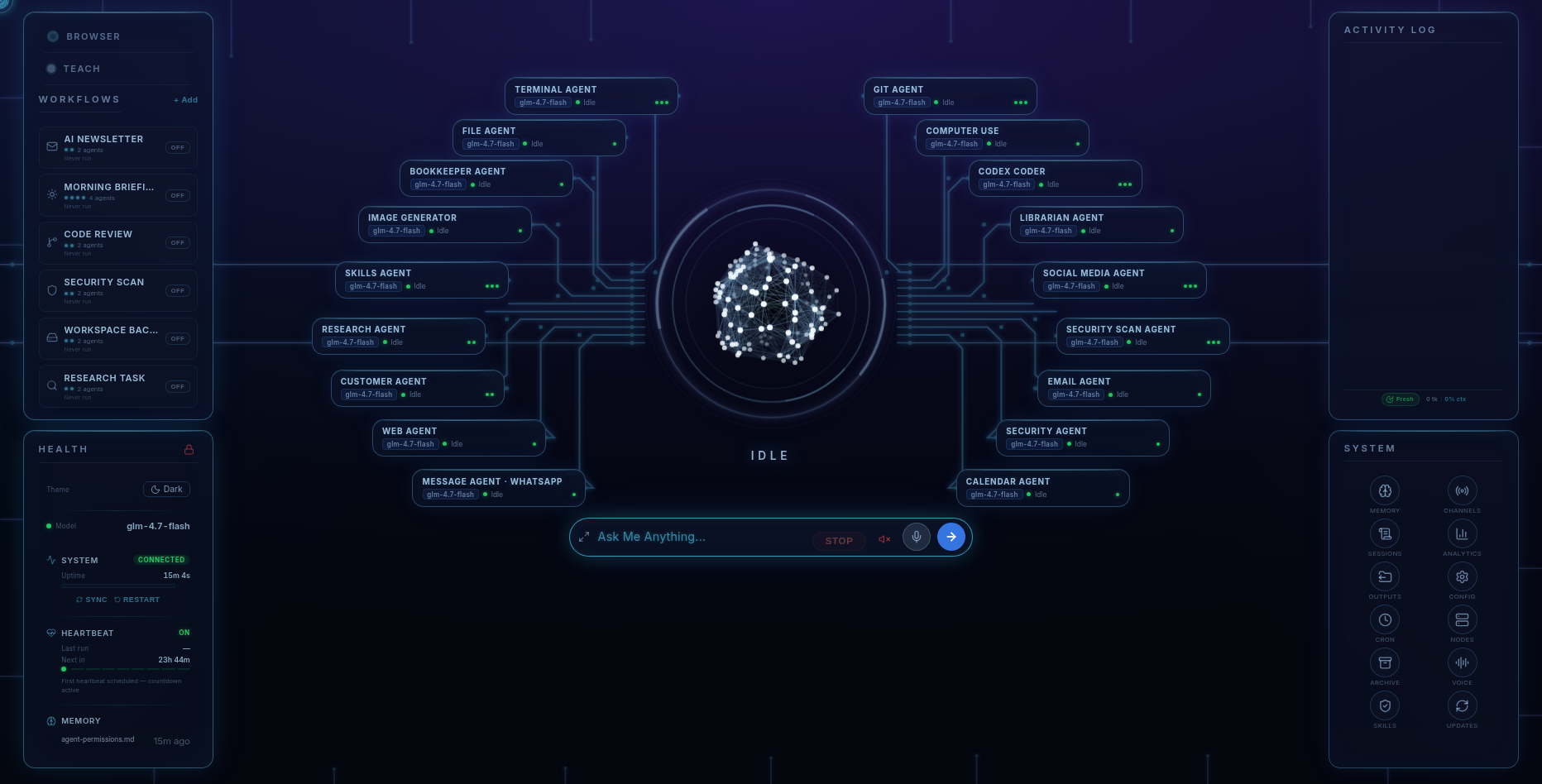
If you run a trade, a practice, or a shop by yourself, Fred can help organise the admin: inbox, invoices, follow-ups, research, and marketing. Fred is the harness installed on your computer, coordinating 18 specialist agents through the models you connect. The software licence is $99; model access and usage are billed separately by your provider.
The problem it solves
The evening shift
Every self-employed person knows the second shift: quoting after dinner, invoicing on Sunday, the customer you meant to call back three days ago, the website you'll get to eventually. None of it is your craft, all of it decides whether the business grows. That's the shift Fred works.
A week, delegated
What handing it over actually looks like
- Monday, 7:00am — the briefing came to you. The Morning Briefing preset ran while you slept: inbox triaged with what matters flagged, calendar laid out, anything overdue surfaced. You read it with coffee instead of digging for it.
- Tuesday — the money admin. "Draft invoices for the Patterson job and the two service calls." The Bookkeeper drafts them and flags an unpaid one from July. You glance, approve, send.
- Wednesday — nobody goes cold. The Customer agent keeps the log: who asked for a quote, who you promised to call, who's overdue a nudge. "Draft a friendly check-in to everyone I quoted this month." Drafts appear; you approve. You approve, Fred posts — that's the standing rule.
- Thursday — the research you'd never get to. "Compare the three suppliers for composite decking — prices, lead times, complaints." The Research agent reads, cross-checks, and hands back a structured report.
- Friday — the marketing you kept postponing. Marketing creative: ad copy drafted, images generated on your own machine, and if you need a landing page for the spring promotion, Fred can write it, build it, and ship it.
- Saturday, from the job site — you text Fred on WhatsApp: "what's the address for the 2pm Monday job, and remind me Sunday to load the trailer." Same Fred, same conversation, already on the big screen when you're home.
Trust, mechanically
Why you can trust it with business things
- Approval gates. Anything sensitive — sending, spending, deleting — passes through you. Fred drafts; you approve. Permission matrices per agent decide what each specialist may touch.
- Your data stays on your machine. Files, memory, credentials — local. Model calls travel to your chosen AI provider on your own key; Six Days West never sees them and collects no telemetry. Your client list is not on someone's server.
- Costs on the glass. Real-time cost tracking on the dashboard — you watch the AI bill as it forms instead of discovering it later.
- A security agent on staff. It audits your machine and code for known vulnerabilities, exposed secrets, risky dependencies, and open ports — plus prompt-injection protection with active blocking underneath.
The business math
Not another seat, not another month
Fred’s $99 software licence includes the agents, dashboard, Android app, owner’s guide, and a year of software updates, with a 14-day refund window. You supply model access through your own provider account and pay that provider separately. The dashboard shows model usage and cost. One machine is licensed at a time, with transfers when you change computers.
The honest requirements
What it needs from you
- A Windows 10/11 (x64) or Ubuntu-class Linux (x64) computer — no macOS build. The phone app is Android only. Internet connection required.
- An AI key from Claude, OpenAI, or Google Gemini (or a local model via Ollama), pasted in once during the wizard.
- Your judgement. Fred drafts, researches, and prepares; the approvals stay yours. It's an assistant with excellent work habits, not an autopilot for your business — and its memory of old conversations can occasionally be imperfect, which we tell you before you buy.
Pricing
Hire it once
Fred’s software licence is $99. It includes the dashboard, agents, workflows, Android app, and owner’s guide. Connect your own model access; your provider bills separately for access and usage. One machine is licensed at a time, with a 14-day refund window.
Software licence: $99 once · Model-provider charges separate · 14-day refund window
FAQ
Questions people ask
Can Fred invoice my clients?
Fred drafts them: the Bookkeeper tracks income and expenses, drafts invoices, and flags what's overdue. You review and send. The same pattern runs through everything money-adjacent — Fred prepares, you approve.
Will it email people without asking me?
Not unless you allow it. Every agent has a permission matrix, and sensitive actions pass an approval gate. The working pattern is: Fred drafts, you approve. Scheduled reports like the Morning Briefing run unattended because they only read and summarise.
Do I need an IT person?
No. Fred installs like any app on Windows 10/11 or Ubuntu-class Linux, asks for your AI key once, and after that you talk to it — from the dashboard, or by texting it on WhatsApp or Telegram from a job site.
What does it cost to run?
The software licence is $99. Your provider charges separately for model access and usage, according to its terms and your workload. Fred’s dashboard helps you track that usage.
Is my business data safe?
Your files, Fred's memory, and your credentials stay on your machine. Model calls go directly from your device to your chosen AI provider on your key — Six Days West never sees them and collects no telemetry.
Before you go
Not ready to spend $99? Take the honest guide instead.
The Straight-Answers Guide to Owning Your Own AI — every hard question on these pages, answered without the sales voice. Free, by email.
Software licence: $99 once · Model-provider charges separate · 14-day refund window
Keep reading