The doorway in your pocket
A Real AI Assistant on Telegram — Yours, Not a Bot Service
Telegram is a doorway to Fred on your computer. Text your harness from a phone, desktop, or web client, and Fred coordinates the task through your configured tools and models. The software licence is $99; your own provider bills separately for model access and usage.
The difference that matters
A bot in their cloud vs an assistant in your house
Your Telegram message reaches the Fred harness on your machine. Fred uses the model access you have connected to interpret the request and coordinate its tools. The model provider supplies the intelligence and bills your account separately.
- One conversation, every screen. What you text from the platform is already on the dashboard when you sit down. One Fred, many windows.
- Real work over text. "Draft a reply to the Hendersons." "Research composite decking suppliers." "What's overdue?" "Run the morning briefing again." The answers come from the machine that has your actual stuff.
- Approval stays with you. Fred drafts; you approve. Anything sensitive passes an approval gate you configured once on the dashboard.
Phones, honestly
Any device can text him. One kind can talk.
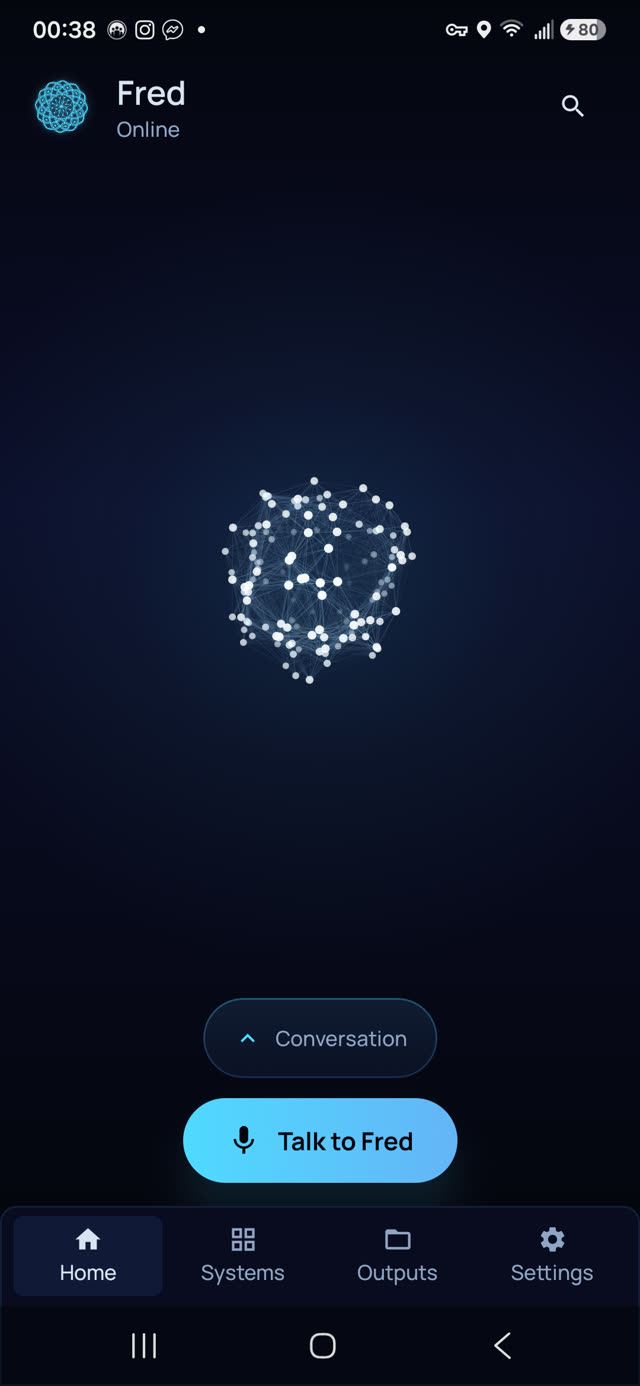
Telegram works from any phone — iPhone included — plus desktop and the web client, all synced to the same thread. That's the honest headline for people who don't want another native app: you already have Fred in your pocket. Telegram also reaches you by username rather than phone number, so Fred never needs your number to answer you there. The dedicated Android app adds the extras: spoken conversation out loud with more than fifty voices, the gallery of everything Fred has made, workflow runs, and per-agent controls — paired to your machine over an encrypted tunnel, not to any cloud.
A day of texts
What it looks like in practice
- 7:05am — the Morning Briefing preset already ran. You read it on your phone with one thumb: inbox triaged, two things flagged, one payment overdue.
- 10:40am, from the van — "chase the quote I sent Tuesday, friendly." A draft comes back; you reply "send it" and it goes out through your approval, not behind your back.
- 1:15pm, at the desktop app — "compare the three suppliers for the spring job, prices and lead times." Same thread you started on the phone; the report lands in it.
- 9:30pm, sofa — you ask out loud (Android app, your pick of more than fifty voices) what tomorrow looks like. Fred tells you. Your thread stays yours.
Privacy, plainly
Where your words actually go
The pairing runs on your own machine — Fred answers from your hardware. Your files, Fred's memory of you, and your credentials never leave your computer. When AI thinking is needed, the request goes directly from your device to the provider you chose — Claude, OpenAI, or Google Gemini on your own key, or a local model via Ollama. Six Days West never sees your messages and collects no telemetry. Telegram carries the text to and from your machine the same way it carries any chat — regular Telegram chats aren't end-to-end encrypted the way a Secret Chat is, so if a message is too sensitive for a messaging app, say it to Fred at the dashboard instead.
Where the sci-fi ends
The honest limits
- Telegram is the messenger, not the security layer. Ordinary Telegram chats are cloud chats, not end-to-end encrypted by default — the privacy that matters here is Fred's (files, memory, and credentials never leaving your machine), not Telegram's.
- It needs the internet. The thinking happens at your chosen AI provider on your own key. Local-first, not fully offline.
- Platforms: Windows 10/11 (x64) or Ubuntu-class Linux (x64) — no macOS build. The phone app is Android only; Telegram itself is what gets you in from an iPhone.
- Memory can slip. Fred's recall of earlier conversations is generally solid but can occasionally be imperfect. We say so before you buy.
Pricing
The assistant behind the chat
Fred’s software licence is $99. It includes the dashboard, agents, workflows, Android app, and owner’s guide. Connect your own model access; your provider bills separately for access and usage. One machine is licensed at a time, with a 14-day refund window.
Software licence: $99 once · Model-provider charges separate · 14-day refund window
FAQ
Questions people ask
How is this different from Telegram AI bots?
Telegram connects you to your own Fred harness, its tools, and its memory. You supply the model access Fred uses, with provider charges billed separately.
Does it work on iPhone?
Texting Fred works from any device that runs Telegram — iPhone, Android, desktop, or the web client, all synced to the same chat. The dedicated Fred app (which adds spoken voice and the outputs gallery) is Android only.
Does Fred need my phone number?
Telegram bots reach you by username, not phone number, so Fred never needs your number to answer you there. That's a genuine reason some people pick Telegram as their channel over WhatsApp.
What can I actually do by text?
Anything Fred does at the desk: ask for research, request drafts, check this morning's briefing, kick off a workflow, ask what's overdue. It's one conversation — what you text from the train is on the big screen when you get home.
Will it message people on my behalf?
It drafts; you approve. Sensitive actions pass approval gates you control from the dashboard. The standing pattern is: you approve, Fred posts.
Is the pairing private?
The channel pairing runs on your own machine — Fred is the one answering, from your hardware. Your files, memory, and credentials never leave your computer; AI model calls travel from your device to your chosen provider on your own key.
Before you go
Not ready to spend $99? Take the honest guide instead.
The Straight-Answers Guide to Owning Your Own AI — every hard question on these pages, answered without the sales voice. Free, by email.
Software licence: $99 once · Model-provider charges separate · 14-day refund window
Keep reading